2026-10-03 · Guides
llms.txt for WooCommerce stores
llms.txt is a short text file at the root of a website, at yourstore.com/llms.txt, that tells AI tools
what the site is and where the important pages are. Think of it as a one-page brief for a machine: who you
are, what you sell, and links to the pages worth reading, without the menus, banners and scripts of a normal
web page.
It's cheap to add and takes about twenty minutes. This guide covers what it is, what to put in it, and how to add one to a WooCommerce store.
What's known about llms.txt, honestly
llms.txt is a proposed standard, published at llmstxt.org in 2024. It's not an official web standard like robots.txt, and none of the big AI shopping assistants has publicly said it uses llms.txt to choose products. Some AI tools and developer platforms do read these files, and the format is spreading.
So treat it as a small, low-risk extra, not a ranking trick. The things that matter more for AI shopping are crawlers being allowed in, product structured data, GTINs and brands. If you haven't done those yet, start there. Our ChatGPT visibility guide lists them in order.
Step 1: decide what AI tools should know
An llms.txt for a store answers a few questions in plain words:
- What is the store, and what does it sell?
- What are the main product ranges, and where are they?
- What are the policies a shopper would ask about: shipping, returns, where you ship to?
- Anything that sets you apart and is true: made in small batches, ships from one country, a size guide.
Keep it factual. It's not the place for slogans or claims you can't back up.
Step 2: write the file in Markdown
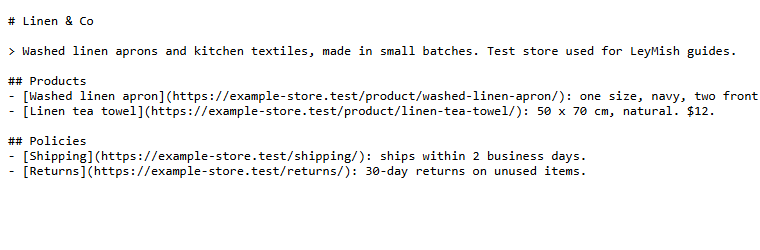
The format is plain Markdown with a simple structure:
- A heading with your store's name (
# Store name). - A one- or two-sentence summary in a quote block (
> ...). - Sections (
## ...) with lists of links, each with a short note on what the page is.
Here's the file on our test store:
And a template you can copy:
# Your Store Name

> What you sell, in one or two plain sentences. Where you ship from.

## Products
- [Category or best seller](https://yourstore.com/product-category/aprons/): what it is, price range.
- [Another category](https://yourstore.com/product-category/towels/): what it is, price range.

## Policies
- [Shipping](https://yourstore.com/shipping/): where you ship and how fast.
- [Returns](https://yourstore.com/returns/): the return window and conditions.

## About
- [About us](https://yourstore.com/about/): who makes the products.
For a small store, list your categories and best sellers rather than every product. AI tools can find the rest from your sitemap and the Store API.
Check your store in 10 seconds
The free online checker runs 5 outside checks on your store, including this one, and gives you a score out of 5.
Step 3: upload it to your site's root folder
Save the file as llms.txt (plain text, UTF-8). Then put it in your site's root folder, the one that
contains wp-config.php:
- Your host's file manager: open the root folder (often called
public_html) and upload the file. - SFTP: upload it to the same folder with a client such as FileZilla.
WordPress has no llms.txt setting of its own. Some SEO plugins have started adding llms.txt generators; if yours has one, use either the plugin or a file, not both.
Step 4: check it at yourstore.com/llms.txt
Open https://yourstore.com/llms.txt in your browser. You should see your text exactly as you wrote it. If
you see your store's 404 page or your home page instead:
- Check the folder. The file must be in the same folder as
wp-config.php, not insidewp-content. - Clear your cache. A caching plugin or CDN may still be answering for that address.
- Check the name. It must be
llms.txt, all lowercase, notllms.txt.txt. Windows hides file extensions by default, which makes this easy to get wrong.
Also make sure your robots.txt doesn't block it. Our robots.txt guide covers what to allow.
Step 5: keep it up to date
An out-of-date llms.txt is worse than none: it sends AI tools to old categories and old policies. Update it when you add or remove a product range, change shipping or returns, or move pages. A reminder every few months is enough for most stores.
Doing it automatically
Writing the file by hand works well for small stores. If you'd rather not maintain it, LeyMish Pro can
generate /llms.txt for you from your WooCommerce data and keep it current as products change. A real file
in your root folder always takes priority, so you stay in control.
The free plugin and the online checker both tell you whether your store has an llms.txt, alongside the checks that matter more: crawler access, structured data and product identifiers.